Running Capella and Papyrus systems engineering tools on Apple Silicon using Docker

When teaching systems engineering, I often ask students to install modeling tools such as Capella or Papyrus. However installation can sometimes be difficult for students. Debugging differences in operating systems, hardware, and software dependencies can quickly consume valuable teaching time.
This post describes how to create Docker images for Capella and Papyrus, and run them in containers while accessing them using XPRA and a web browser. This approach allows students to run the tools without installing them directly, and also works well on Apple Silicon Macs.
Background
The students taking the Systems Engineering Workshop have a week of classroom-based teaching. During this time, they undertake a number of computer-based activities, which provide a realistic simulation of the experience they will have when doing systems engineering at work.
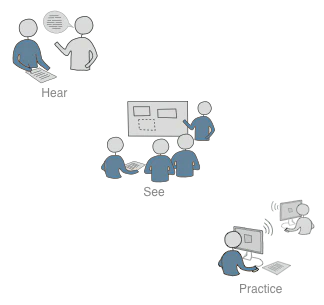
Students learn through:
- hearing;
- seeing;
- doing.
The act of doing systems engineering and systems definition activities in the class helps to reenforce the theory and ideas that the students hear and see. Also, these activities provide the students with experience using a systems engineering application before they leave the classroom environment.
Classroom contact time is valuable
I want to focus on teaching. I don’t want to use contact time dealing with systems engineering application installation issues. In other courses I solved this problem using virtual machines. However, virtual machines are relatively heavy and require significant disk space and memory. Also there are potential license issues distributing propriety operating systems and applications within a virtual machine.
Modern development workflows increasingly favor containers to provide lightweight and reproducible environments, which use GNU Linux distributions alleviating the licensing issues.
Overview of the Architecture
The starting point for this solution is the excellent MBSE Docker images repository created by DB InfraGO. Their repository provides Dockerfiles and scripts for running Capella and Papyrus inside Docker containers, including a mechanism for remote graphical access.
Running applications inside a Docker container removes the need to run the modeling tools directly on the host machine. The graphical interface is exported using XPRA, which allows the applications to be accessed through a web browser.
The containers include:
- GNU Linux runtime environment
- Eclipse-based modeling tool
- XPRA server for remote display
The XPRA server exports the application’s graphical interface to a browser. This approach works well for teaching because students only need:
- Docker Desktop
- a web browser
Why XPRA Instead of X11
Often applications running in Docker containers use X11 forwarding to present the graphical interface to the user. However, this approach can be fragile on Mac OSX and requires additional software such as XQuartz.
XPRA runs inside the container and exports the graphical interface through an HTTP server. The browser then connects to the application.
This approach has several advantages:
- no X server required on the host
- works well across operating systems
- easy access through a browser
- suitable for classroom environments
Note: The DB InfraGO images also offer Remote Desktop Protocol (RDP) as an alternative means of access to the application’s graphical interface. However, this requires the student’s computer to be running an RDP client.
Building the Capella Docker Image (ARM64)
The first step is to clone the DB InfraGO repository.
cd ~/devops
git clone --recurse-submodules https://github.com/dbinfrago/capella-dockerimages.git
Next, the Capella ARM64 distribution archive is downloaded.
cd ~/devops/capella-dockerimages/capella/versions/7.0.0/arm64

curl https://mirror.umd.edu/eclipse/capella/core/products/releases/7.0.0/capella-7.0.0.202407091438-linux-gtk-aarch64.tar.gz \
--output capella.tar.gz
Building the Base Docker Image
The base image provides the common Linux environment used by the containers.
cd ~/devops/capella-dockerimages

docker build -t base base
Building the Capella Image
Next the Capella image is built for the ARM64 architecture.
docker build -t capella/base capella \
--build-arg BUILD_TYPE=offline \
--build-arg CAPELLA_VERSION=7.0.0 \
--build-arg BUILD_ARCHITECTURE=arm64
Building the Remote Access Image
The remote image includes XPRA and the configuration required to access the application from a browser.
docker build -t capella/base/remote remote \
--build-arg BASE_IMAGE=capella/base
Running Capella in a Browser
Once the container image is built, Capella can be launched.
docker run -d \
--name capella-xpra \
-p 10000:10000 \
-e CONNECTION_METHOD=xpra \
-e XPRA_SUBPATH="/" \
-e AUTOSTART_CAPELLA=1 \
-e RESTART_CAPELLA=1 \
-v ~/data/capella/workspace:/workspace \
capella/base/remote
The Capella interface can then be accessed at:
http://localhost:10000/?floating_menu=0
At the time of writing, Google Chrome works better than Safari for the XPRA interface.
Building the Papyrus Docker Image
Papyrus is another Eclipse-based modeling tool used for model-based systems engineering.
Papyrus currently runs most reliably in the Apple ARM64 environment using AMD64 architecture containers. Docker on Apple Silicon runs AMD64 images using emulation.
The Papyrus archive is downloaded and placed in the repository directory, for example:
capella-dockerimages/papyrus/versions/6.7.0
Building the Papyrus Image
First the base image is built for AMD64.
cd ~/devops/capella-dockerimages

docker build \
--platform linux/amd64 \
-t base \
base
Then the Papyrus base image is built.
docker build \
--platform linux/amd64 \
-t papyrus/base:6.7.0 \
--build-arg BASE_IMAGE=base \
--build-arg PAPYRUS_VERSION=6.7.0 \
papyrus
Finally the remote-access image is built.
docker build \
--platform linux/amd64 \
-t papyrus/remote:6.7.0 \
--build-arg BASE_IMAGE=papyrus/base:6.7.0 \
remote
Running Papyrus in a Browser
Before starting the container, create a workspace directory.
mkdir -p "$HOME/data/papyrus-workspace"
Then run the container:
docker run -d \
--rm \
--name papyrus-remote \
--platform linux/amd64 \
-p 10000:10000 \
-p 9118:9118 \
-e CONNECTION_METHOD=xpra \
-e XPRA_SUBPATH=/ \
-e AUTOSTART_PAPYRUS=1 \
-e RESTART_PAPYRUS=1 \
-v "$HOME/data/papyrus-workspace:/workspace" \
papyrus/remote:6.7.0
The Papyrus interface can then be accessed in a browser at:
http://localhost:10000/?floating_menu=0
ARM64 Considerations
Running these modeling tools on Apple Silicon requires some attention to CPU architecture.
Capella
Capella provides a native ARM64 Linux build, which allows the container to run directly on Apple Silicon.
Papyrus
Papyrus Classic requires AMD64, so the container runs using Docker’s built-in emulation.
While emulation introduces a small performance overhead, the application still runs well enough for teaching and demonstration purposes.
Advantages for Teaching
Using Docker containers for modeling tools offers several advantages:
Consistent Environment
All students run the same software environment.
Fast Setup
Students only need Docker and a browser.
Easy Reset
Containers can be removed and recreated quickly.
Cross Platform
The containers work on:
- Mac
- Linux
- Windows
Lessons Learned
Several lessons emerged from this work.
Open Source Accelerates Development
The DB InfraGO Capella MBSE Docker image repository provided an excellent starting point.
XPRA Works Well for GUI Containers
XPRA provides a robust solution for running graphical applications inside containers.
Containers Reduce Classroom Friction
Containerized environments significantly reduce installation issues during workshops.
Conclusion
Using Docker containers to package Capella and Papyrus provides a reliable and reproducible teaching environment for systems engineering workshops.
By building on the work published in the DB InfraGO MBSE Docker images repository, it was possible to create containerized modeling environments suitable for modern Apple Silicon systems.
Using XPRA and a browser interface makes the tools easy to run and avoids many of the configuration issues associated with using graphical applications in containers.
For teaching environments, containers provide a practical and flexible alternative to traditional virtual machines or direct application installation.